If you count on web traffic from Google to win customers online, you’ve got a great new opportunity to get some additional visibility – Google +1.
Google rolled out +1 a few months ago, but many Google users have yet to see the feature. Here’s how you can get started using +1 to promote your business.
Step 1: Make sure you can see the +1 button in search results
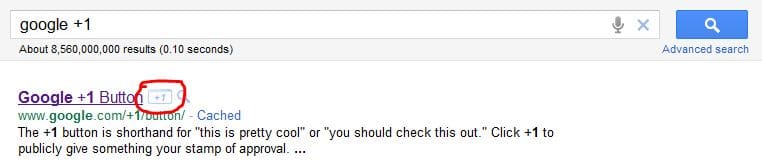
The +1 button typically appears in search results to the right of a link, but only if you are signed in to your Google account. If you have a Google account, sign in (or create one if you don’t). Then, try a search in Google and you should see the +1 icon like this:
 Step 2: Use the +1 button to “like” good links
The +1 button functions similarly to the “like” button on Facebook. Clicking the button says, “This is a good website.”
Google will track all of your +1s, and you’ll be able to go back and refer to them.
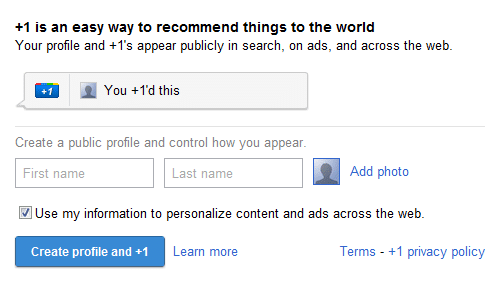
NOTE: Before you can +1 a site, you have to create a public Google Profile. If you try to +1 something without one, you’ll get a dialog box that will prompt you to create one.
 In addition, your Google contacts will be more likely to see a link that their friends, including you, have +1’d than if they hadn’t. This is important to understand in a minute, when we’ll talk more about how to market your business using +1.
Step 3: Add the +1 button to your website
The challenge of the +1 is that often, a user has to get to your website to decide that it’s worthy of the +1. But what are the chances that they’ll go back to the Google search results page and hit the button? The way around it: install the Google +1 button on your website.
Google’s simple code generator will help you choose what you want your button to look like and automatically create the code you need to insert on your website to allow your web visitors to +1 your site while they are on your site. This is a great way to help promote blog posts, products and more that your customers love.
Making sure that this +1 button is easy to find is a great start in getting your customers to help promote your website for you.
What does Google +1 do for your business?
While it’s still in the early stages, Google has already said that data from +1 will impact search results. So, if you’ve got a hundred people who give your site the +1 thumbs up, you’re more likely to get web traffic than your competitors.
 Dave Gruen leads the consulting division for BolderImage, a full-service web marketing and mobile development agency with offices near Chicago. A developer and IT manager by trade, he now leads design, development and strategic marketing efforts for businesses and non-profits nationwide. Check out the BolderImage website for an example of +1 in action.
Leave a Reply